Last updated: August 29, 2026
This page documents the call to action and opt-in flow for our A2P messaging campaign. Ingenium Orbit is a point-of-sale and customer rewards platform used by retail merchants. Opt-in happens only in person, at a merchant's checkout counter. There is no website form, no keyword, and no QR code opt-in path — which is why the consent screen is reproduced here in full, so it can be reviewed without visiting a store.
The call to action
A cashier asks the customer whether they would like to join the store's rewards program. If the customer says yes, the cashier starts sign-up and a customer-facing display turns to face the customer. Everything below is entered and tapped by the customer, not by staff.
The consent screen, as the customer sees it
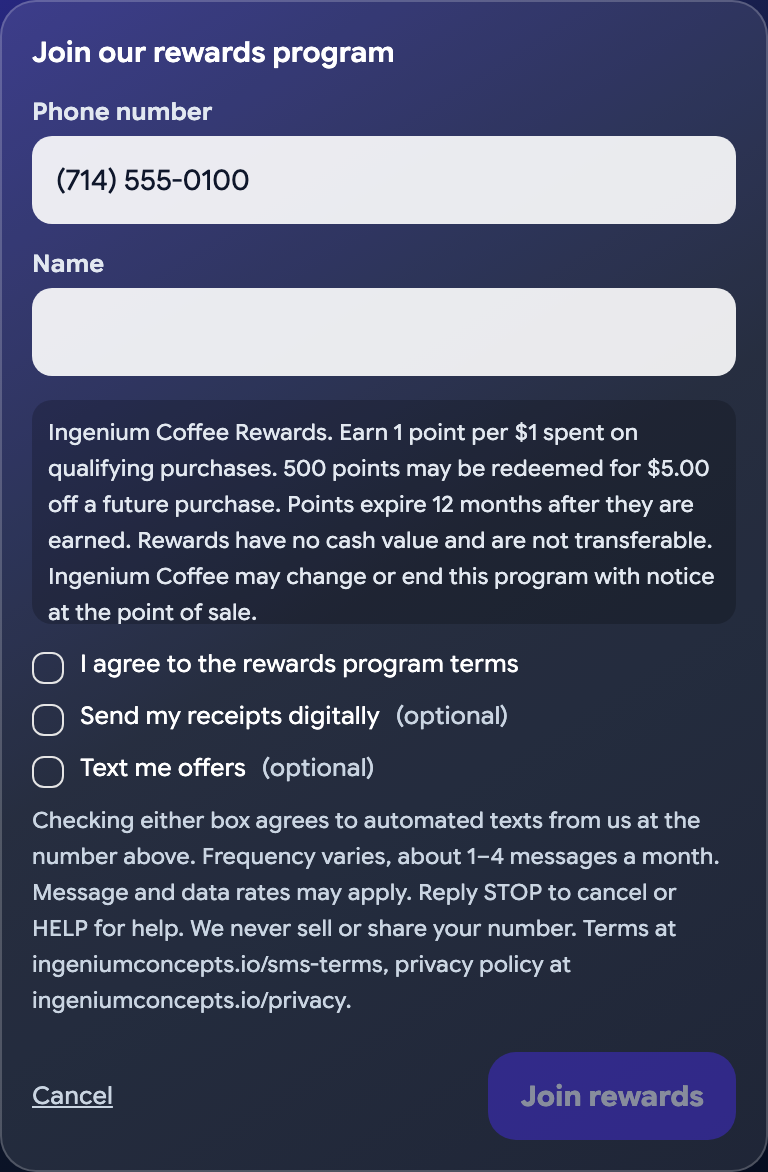
What each element does
- Phone number. Typed by the customer on the customer-facing display. Staff do not enter it and do not submit the form on the customer's behalf.
- "I agree to the rewards program terms." Required to join the rewards program. Unchecked by default. This grants no messaging consent of any kind.
- "Send my receipts digitally." Optional and unchecked by default. Transactional consent only: purchase receipts and rewards account notices.
- "Text me offers." Optional and unchecked by default. A separate, independent marketing consent. Leaving it unchecked has no effect on enrollment, on receipts, or on the purchase. Agreeing to marketing texts is never a condition of any purchase.
- The disclosure paragraph. Fixed platform text shown directly beneath the two SMS checkboxes, at the moment of consent. It carries the message frequency, the rates disclosure, STOP and HELP instructions, the non-sharing statement, and both policy URLs.
- "Join rewards." Tapped by the customer to submit.
What is recorded
Each consent choice is stored separately, alongside the mobile number in E.164 format, the exact version of the rewards terms that was displayed on screen, and a timestamp. A phone number entered only to look up an existing rewards account is never treated as consent to receive messages: no message is sent to a number unless a stored consent record covering that message type exists for it.
Opting out
Replying STOP is processed on receipt: the number is recorded as opted out, both SMS consents are withdrawn for every customer holding that number, and any receipt already queued to it is cancelled before it sends. Replying HELP returns help information. Customers may also ask staff at any location to remove their number.
Related documents
Questions about this campaign: info@ingeniumconcepts.io